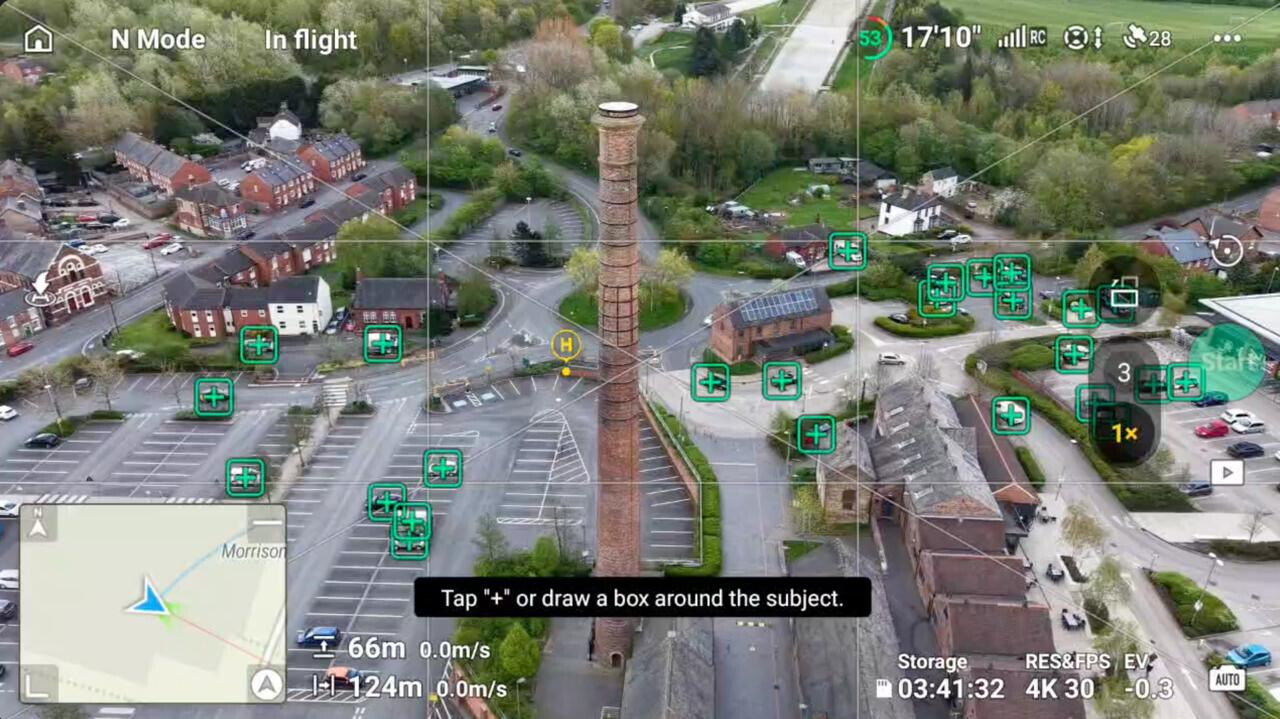
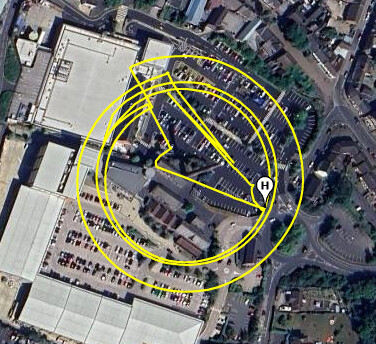
Yesterday I went out to get some shots for the RTF challenge and in Swadlincote there is a fab tower / chimney - called The Tall Chimney ( I know orignal haha )
Thought I would do an orbit around it - so off to select the orbit quick shot and well all hell broke loose really haha - you think the Air 3s would pick the largest object in the screen for this ? Nope haha - just as well I can do an OK ish manual orbit haha - but this is just crazy !
I did try and force it to pick the tower but it would not have it - so not overly sure what the best way around this is ? Is there a way ? I was just being lazy really and I do actually like flying orbits manually to get them nice and smooth ( and its kinda easy to do so when you know what you have to do )
3 Likes
Did you try drawing a box round the subject, such as the highlighted top of the chimney?
Yeah I did quite a few times and it sort of selected it but after a few seconds into the flight it would let go of it.
Try Master Shots scenery circle might better give you what you want.rather than quick shots or even waypoints with the tower as POI could work too.
2 Likes
will have to give this a go next time - I did have it work before with another tower sometime ago ( I think - or maybe I did that manually too )
1 Like
I don’t know if I’m doing something wrong but I’ve had similar issues, tried to do a circular sweep of st Mary’s shell on Cleveleys beach, selected shell as poi and used right stick to perform a anticlockwise circle but it lost after performing a 90 deg arc.
I have the screen recording - as soon as I have a moment I will upload it and share it so you can see what I was doing.
Everything I capture on my Air 3S is done manually bar the odd use of the zoom. I just think it makes a better flying experience.
4 Likes
Oh 100% agree - I was just being lazy this time round ( well trying to be lazy ) I did get the shot in the end by doing it all manual / old school
1 Like