Don’t know when they specifically fixed it .. but, now, at least cancelling a render cancels it immediately.
(Although - I need to check on mega complex fusion projects, which might have contributed to the really slow termination of a render.)
What’s New in DaVinci Resolve 20.3 ?
Nothing, very much, just tweaks .. unless you have an M5 mac when you can now do 32k video. #cinematic
The following features have been added or updated.
Up to 32K resolution support with Apple M5 processors.
Improved performance for Resolve FX Noise Reduction.
Timeline backups now allow named snapshots for versioning.
Support for adding metadata fields as media pool bin columns.
Media Pool metadata ALE import and export support.
Option to create custom metadata for unknown fields on import.
Exported metadata files now include custom metadata fields.
Media pool views and state are now retained for each project.
Edit menu action to insert gap at playhead.
New assignable key shortcut in media pool to start a search.
Assignable key shortcut for open in timeline with source viewer.
Speed change and duration change actions now follow sync lock.
Added 2.39 and 2.40 broadcast safe aspect ratios.
Alpha support for film look creator, film damage and analog damage.
Support for IMF workflow for HDR Vivid and Audio Vivid.
Ability to embed HDR10+ metadata in QuickTime and MP4 encodes.
Ability to set stereoscopic mode in clip attributes for MXF clips.
Improved match frame behavior for clips with negative speeds.
Addressed missing clip actions in subtitle caption context menu.
Addressed intermittent lag when using stacked timelines.
Addressed source timeline not restored when switching back to edit.
Addressed issue tracking with high-quality deinterlace in Fusion.
Addressed issue with immersive world pose if using Fusion tools.
Addressed issue loading some deep OpenEXR files.
Addressed decode issues with compressed ARW clips.
Addressed AI Music Remixer muting audio on macOS 26.1.
Addressed possible QuickTime decode hang on Windows.
Addressed Remote Monitor start up issue on Windows.
General performance and stability improvements.
Note:
OzoneVibe:
“Named Timeline backups” now allow named snapshots for versioning.
OK - this seems semi new. and liking this already. Better than versioning, IMO.
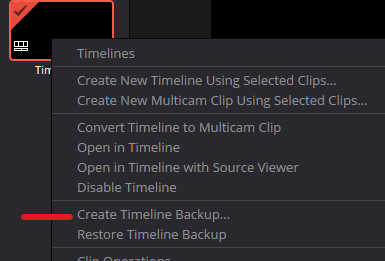
Right-click timeline icon in media pool
Select “Create Timeline Backup”
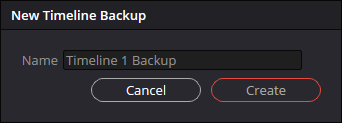
Enter name .. eg significant reason to want a point to go back to.
It also auto date/times the backup - see below.)
Later, selecting the restore option gives you a list of available backups:
This must have been partially implementated for a while (and I hadn’t noticed?), since all my recent projects have backups available for each save time over the past month or so. This little gem has already saved me a total ball-ache!
Caution with compound clips, though, if these have been changed in between time .. because they really are a nested timeline kind of thing.
There’s also a “Compare with current timeline” option .. but not fully sure about when you can compare what with the current timeline. Would be nice if you could select a backup to compare with before you restore it, but you can’t.
Never used a backup yet only stepped back in the history.
On a positive note, this latest update has transformed the performance of my i7 12th gen NVIDIA RTX 3050 gpu setup no end!
GPU runs at 34% and CPU 20% (GPU was often at 99%) now and even using AI retime is smooth instead of crashing my PC!
Brill.
Backups for my complex Fusion projects are an absolute essential feature .. especially on an old laptop where clicking on something can trigger an instant DVR crash.
These timeline backups would be useful for another ongoing “project” - where I’ve duplicated timelines within the project and then duplicated the project .. in an attempt to have multiple restore points. (A decent laptop would make most of them unnecessary.)
Would have been useful for a recent edit, too … that was also complex and took nearly a week to complete from start to finish.
I’ve not done a specific test on Fusion clips, either .. although “clips” would suggest they should be correctly backed up in the timeline backup.
Nothing exciting - just tweaks ..
What’s New in DaVinci Resolve 20.3.1
The following features have been added or updated.
Addressed a crash in the metadata view with some custom fields.
Addressed an issue with stereoscopic 3D video monitoring output.
Addressed an issue with embedding HDR10 metadata.
Addressed client preview with viewer overlays on remote monitor.
Addressed effects search issue for Chinese, Japanese and Korean.
Addressed issue using embedded Dolby Vision metadata in IMF.
Addressed incorrect Fusion viewer overlay positions after transforms.
Addressed MultiMerge masking issue with concatenated transforms.
General performance and stability improvements.
After almost two months, and the big expo in Vegas which they usually follow up with a large upgrade .. almost nothing ..
What's New in DaVinci Resolve 20.3.2
Preferences option to enable dynamic trim for trim editor in edit.
More consistent kerning for subtitles.
Magic mask cache is now retained when pasting node attributes.
Improved render speeds for side-by-side stereoscopic 3D renders.
Up to 2.5x faster SuperScale Enhanced with Apple Neural Engine.
Progressive renders for interlaced timelines with same frame rate.
Addressed issue with lens correction of vertical clips.
Addressed incorrect ILPD used with disabled clip on higher tracks.
Addressed incorrect aivu when rendering marked timeline ranges.
Addressed incorrect ImmersivePatcher behavior with proxy media.
Addressed timecode issue for proxies from stereoscopic 3D EXRs.
Addressed issue localizing media pool column headers.
Addressed slow media management start up for larger projects.
Addressed ProRes RAW decode issue when using ACES.
Addressed issue with editing effects on a locked node stack layer.
Analog Damage disabling CRT scan no longer disables restless foot.
Addressed potential flicker in face refinement eyebag removal.
Addressed retention of MaxCLL from XML when exporting IMF.
Addressed issues with Dolby Atmos external renderers.
Addressed ADC reverb delay compensation issue in some projects.
Addressed incorrect pass through behavior for Sony XAVC renders.
Addressed issue decoding some Sony ARW clips.
Addressed incorrect render size estimates for some MXF clips.
Support for Fujifilm F-Gamut C colorspace and F-Log2 C gamma.
Support for Dolby headphone personalization of binaural monitoring.
General performance and stability improvements.