Been chatting to a fellow dronist and this scenario has split opinion, so hope you can help
I am at the top of a cliff and the bottom of the cliff is say 135m below. If I take my drone down to the bottom to 5m above the ground(so 130m down). Will I be able to fly it back up to the top or will I need to walk down to the bottom of the cliff and collect it?
As I understand it the 120m limit is from the ground level upwards which means from the bottom of the cliff where I (and home point is) is still 10m too high. OR will the drone say "well the home point is up there so it’s ok to go 120m above where I am now?
Yeah, i know it’s unlikely but one of those curious questions one asks
The altitude will show -130m, it will fly back up no problem
That’s the limit the CAA set but the drone can be set to actually fly to 500m in the app
So as Chris has explained above you can fly up a mountain let’s say and be only 10 meters off the ground but the altitude on the drone will be whatever you have flown upwards from the take-off point
I think it’s going to be a suck it and see to see if the drone will let it come back to you, I would stay close to the cliff I don’t know how accurate the GPS is
Yup. But in my example I flew down(I’m still at the top), which means I then cant get the drone back(as in my example it’s 130m below me) back to where I am. I’d need to walk down the cliff to collect it?
Technically lets say you take off and climb to 10m, as soon as you fly over the edge of the cliff you’re then 140m from the surface so already breaking the height limitation at that point.
Your understanding is correct. It’s 120m above ground level - and the definition of ground level is literally the ground under your drone. So if you flew to 5m above the bottom, keeping 5m above ground at all times, you’d be -130m. If you then flew straight up to be in line with your current position, your drone would show 0m and you’d be 135m above ground level - technically in breach of CAA regs, yes.
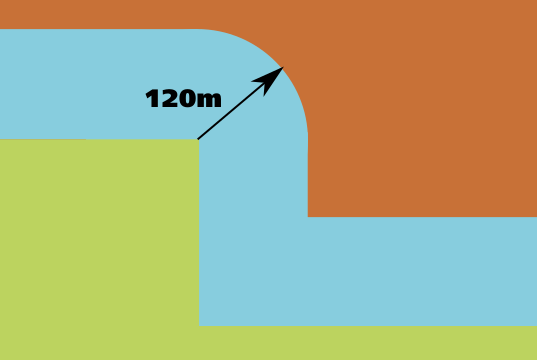
The exact wording is, “Your drone or model aircraft must never be more than 120m (400ft) from the closest point of the earth’s surface” (my emphasis). The 120m limit “above” ground level is actually “away from” ground. If we take the helpful diagram from the CAA and apply it to a cliff, you’ll get this.
So you’d need to be 120m away from the cliff face as well to be in breach.
Hmm… might be easier to walk to the bottom of the cliff/building and fly up and then reverse the footage, Prob a bit hard to do if it’s high tide or otherwise unsuitable for getting down
If you’re flying from the top of the cliff downwards as stated above your altitude will read negative numbers from your takeoff point so even if you set your limit to 120m in the app you’ll be able to fly it back up to yourself on the top of the cliff and then carry on flying 120m upwards from the home point.
also most consumer drones have no actual way of displaying the correct altitude. They have no accurate way to measure the distance to the ground so if you took off from the cliff flew up to 10 meters and flew it stright out in front of yourself over the edge of the cliff so now you know that your drone is 145m above the ground your app will still read 10 meters.