@OzoneVibe Actually Dave, I got it wrong 1st time!  Alt D disables them all.
1 Like
Will watch thanks - for reference the process I use now is from Darren Mostyn, and came about after I was wrecking all my videos trying to use DV colour management and camera inputs / outputs. Since using this latest method my stuff is working well but I am probably ready now for the next steps / level. Will look up that and keyframes.
1 Like
I also wanted to do everything from scratch and manually first, before progressing. Its just my way. Like my flying I only ever use the sticks and manual control, haven’t even looked at the menu or any moves on the controller.
Sat using it, I do all the shortcuts (that I often use) correctly, instinctively. Sat in the cafe at a local park with an exceptionally soggy/muddy pup … nothing is instinctive. 
2 Likes
Me too Dave. Cant even remember half of the Inspector mode titles, but know where they are and which one does what! 
@D0c.Col i dont have a pro, this video is the same route i went before which I had to change I think. I will try it anyway in DV but pretty sure I’ve been down this road
1 Like
Easier than that .. select the clips you want to apply the same grade to, and then centre-mouse-button click the clip with the grade you want applied to them.
Saves having unnecessary stills that need to be labelled to have any long term relevance … especially if you end up tweaking the grade and reapplying.
2 Likes
@OzoneVibe yes that video was good, I’m going to follow all the steps and apply to an existing video to see what difference is made. How crap is the camera on the 3 compared to the pro? The moon in my video was blurred and fluffy, which I didnt expect for 4k. Wondering how much difference a better camera woukd make. Happy to drop a few k on a drone now and keep the mini 3 for riskier stuff.
1 Like
@D0c.Col I have started following the steps in that video. It has changed the image entirely - so I am going to play about with it and follow the whole video. Interestingly I feel that my manual adjustments produced a similar result, however it is quicker doing it via CS from the effects panel.
I don’t really “get it” the CS thing. Why 2 nodes for CST in and out with other nodes in between - and why the the different inputs and outputs? I would have thought it would be one node where it is taking the raw footage, and then passing it through DV’s filters to achieve the output. But - regardless, it seems to work.
The way I understand it, Davinci resolve has a native colour space thats generic. By inputting it in through the Fx colour space you are using DJIs (In this instance) colour setup. The output Fx will convert the colour grading etc that you’ve done into a film standard that is used by YouTube for example ie Rec709a.
You dont necessarily need to do it but you should get a more accurate rendering if you do. Also, when you get a bit more savvy, you may wish to use planar trackers, masking etc, using a node in between input and out output nodes by adding one in series (Alt+s) and using it for that affect only, in doing so it doesn’t bugger up all your other settings that you’ve made.
Thanks, yes I have seen but not yet ventured into serial nodes in a line with spiders webs coming out the sides. I mean, a few weeks ago I was putting out grey, flat footage so the last month or so has been a huge change for me, I feel like if I stop now I have still succeeded.
I was thinking about this - the CST IN must therefore apply the correct settings to the footage “as the drone saw it”, and then you grade that using the middle grading nodes. It then takes what you have done and outputs it into as you say - an output that is designed to play back as close to perfect in Rec 709 so generic screen playback.
1 Like
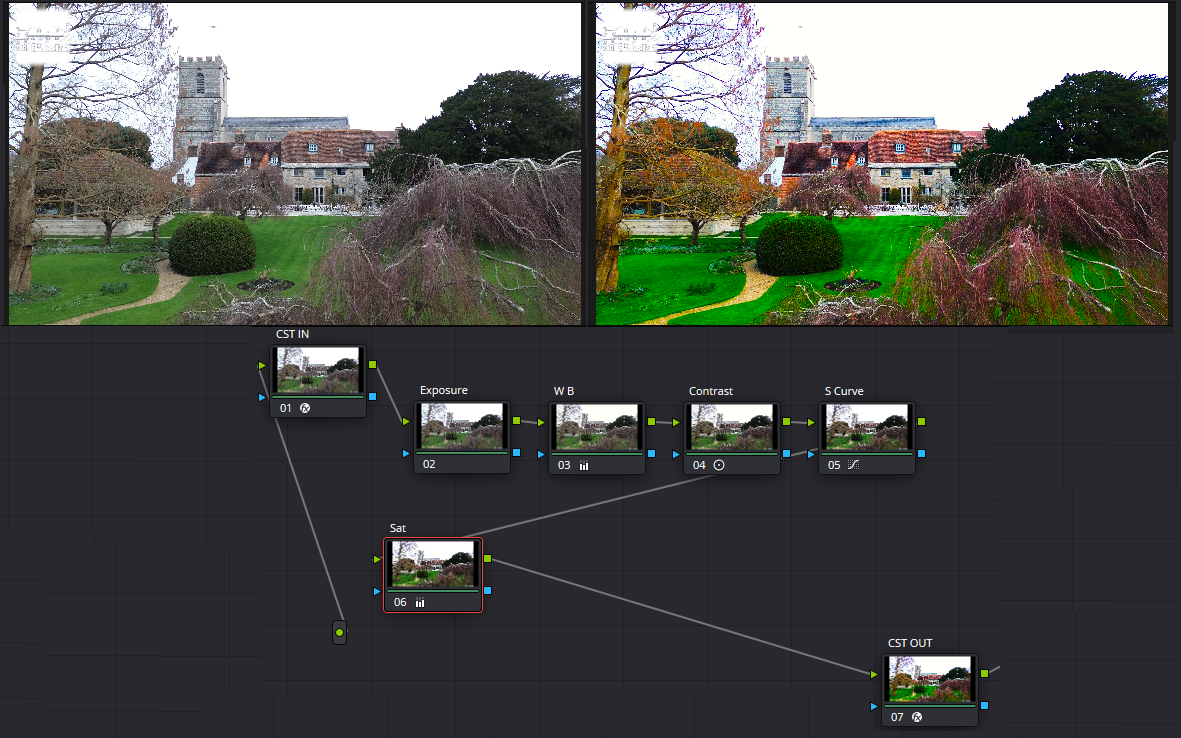
@D0c.Col Interesting, having followed the entire video, I find that the results look WAY too saturated and bright to my eye. I am going to render it anyway (as I have already made this video manually) and watch both side by side. I am pretty sure my manual version will be my preference.
- Grading is subjective.
- No two (unassociated) clips will grade in exactly the same way.
Understand the logic, and then apply to your requirements/expectations.
Also - is your monitor colour calibrated? What you see may not be what others see … or even what you should be seeing.
3 Likes
I also found that whilst I am colour grading on a calibrated monitor (you have to start with a baseline somewhere), my target audience is not watching on one, so end results may depend on whether your footage is being viewed on a computer monitor, iPhone/Android or even a television of indeterminate age. Something you have no control over other than to produce your output using industry standards, like sRGB and Rec709.
It’s also something to bear in mind if producing your photos for electronic or print streams. There are great differences between ink-jet (home and commercial) models, and dye-sublimation (photo printers like Asda, Tesco, LCE etc al) printers due to the types of media/supplies used.
@Pirbright_Drone I find, DJI normal mode is saturated highly and sharp. I turn sharpness down by -1 in the RC and knock the saturation in DR down to 40%.
I use my phone output, which is apparently calibrated cock on and my tele, monitor and tablet are adjusted to it to match the colours etc. Works for me.
1 Like
Calibrated cock? Interesting.
Ok so - do I now upload the video I graded, or the video I have imaged above where I have re worked it and used the process from the video? It is an important video for my channel so important decision!
Neither, matey. I’d use the overly saturated video but with tweaked and reduced sauration.
Re-render and upload it to YT unlisted. See what it looks like compressed.
When I was first learning the vagaries of DR I would upload shed loads of videos before I was happy with a grade before now.
More in tune with it nowadays. 
Well, I rendered a few times, and have settled on something similar to above. It is strong and vibrant, but for this video, so be it. Uploading now, will post it up tomorrow once done. I did dial it down so that the roof tiles were not “chilli red”, so will be interesting to see it on YT. Its a special little overview I did of a very posh place. Cheers - learnt a lot this weekend already! (Just watched Mostyns video on colour grading Drone Footage and some of it conflicts with the one you posted, but I have gone far enough down the rabbit hole for this weekend).
1 Like
Have you done the same thing as before? Used the DJI profile that should only be used for the log desaturated videos. That’s why the output is so over saturated.