In the description, I had added a link to the group
1 Like
Hi there. Where can I find the Dji Battery killer software. I have the hardware. Thank you.
1 Like
help me please … dji Mini 2 Battery … interface connect plus 9volt … read info OK … unseal OK … clear PF ok … clear PF2 ok … reset OK … but when i insert battery in dji charger for a few second led blink ok and final 4 led error charge !!! Possible solution for me ???
- Manufacturer Access = 0x0306
(01) Remaining Capacity Alarm = 712 mAh
(02) Remaining Time Alarm = 10 min
(03) Battery Mode = 0x6001
(04) At Rate = 0 mA
(05) At Rate Time To Full = 65535 min(s)
(06) At Rate Time To Empty = 65535 min(s)
(07) At Rate OK = 1
(08) Temperature = 20 C
(09) Voltage = 7273 mV
(0A) Current = 111 mA
(0B) Average Current = 112 mA
(0C) Max Error = 1 %
(0D) RSOC = 0 %
(0E) ASOC = 0 %
(0F) Remaining Capacity = 0 mAh
(10) Full Charge Capacity = 1835 mAh
(11) Run Time to Empty = 65535 min(s)
(12) Average Time to Empty = 65535 min(s)
(13) Average Time to Full = 1046 min(s)
(14) Charging Current = 4750 mA
(15) Charging Voltage = 8800 mV
(16) Battery Status = 0x4890
(17) Cycle Count = 5
(18) Design Capacity = 2250 mAh
(19) Design Voltage = 7700 mV
(1A) Cpecification Info = 0x31
(1B) Manufacture Date = 0x514F - 2020.10.15
(1C) Serial Number = 3415
(20) Manufacturer Name = ATL NVT
(21) Device Name = BA01WM161
(22) Device Chemistry = 2887
(23) Manufacturer Data = 0x06030000
(3C) Battery Cell 4 Voltage = 0 mV
(3D) Battery Cell 3 Voltage = 0 mV
(3E) Battery Cell 2 Voltage = 3545 mV
(3F) Battery Cell 1 Voltage = 3728 mV
(D8) DJI Battery S/N : 3QFPHAECA30115
Balance the cells to within 0.08V
1 Like
Hello . New to this forum. I have not flown my Mavic Pro for a few years, and the battery is locked down. I see that there is software to help me unlock it but can’t seem to find it here, would someone be so kind as to share that link with me please ??? thanks in advance!
Having read thru the thread on this subject & downloaded the software, am I right that this is for Windows only; there is not a Mac version? Many thanks
Yes I’ve not seen a Mac version, you might get it working with an windows emulator
when I click that link it says the page does not exist or for members only?
1 Like
1 Like
Thanks Wayne.
1 Like
I am in the USA. am I to understand that I will have to purchase something like that insurance to get member access?
Subscribed. 
1 Like
Watched the video on using this software with the reader, i plugged it into the battery, it recognized it but gave me the error. In the video he says if you get an error its because the power is to low and states you can use a 9v battery, my question is do i just use the baytery for 5 to 10 min then unplug and go back to the reader or do i plug the 9v battery up the same time and leave it connected while i reset the battery? Or will that hurt the card?
I need to give my battery a jump start, thing is I tried a 11.1 LiPo battery but I got sparks and it burnt the tip, then a 7.4 LiPo and it melted the wires. I see there are 4 positive and 4 Negative slots, is there a certain way or ports that I am to use to give this bit of power so that the reader can get enough power to reset it?
1 Like
What you need to do is watch this video
Pay attention to the first chapter about burning your house down 
The battery you have will need to be taken apart and the cells analysed to determine if they are recoverable, only then would you reset the BMS
You may have released the magic smoke 
G’day guys,
New to the club from Australia. Having spend hours reading the forums I still cannot seem to find a solution to my Mavic Air 1 battery issues. Bought the CP2112, downloaded the software and charged the three problem batteries (all cells now at 4.3-4.6V). I have a fourth battery, which was still good, and the software had no problems reading it. When using the software the below issues come up:
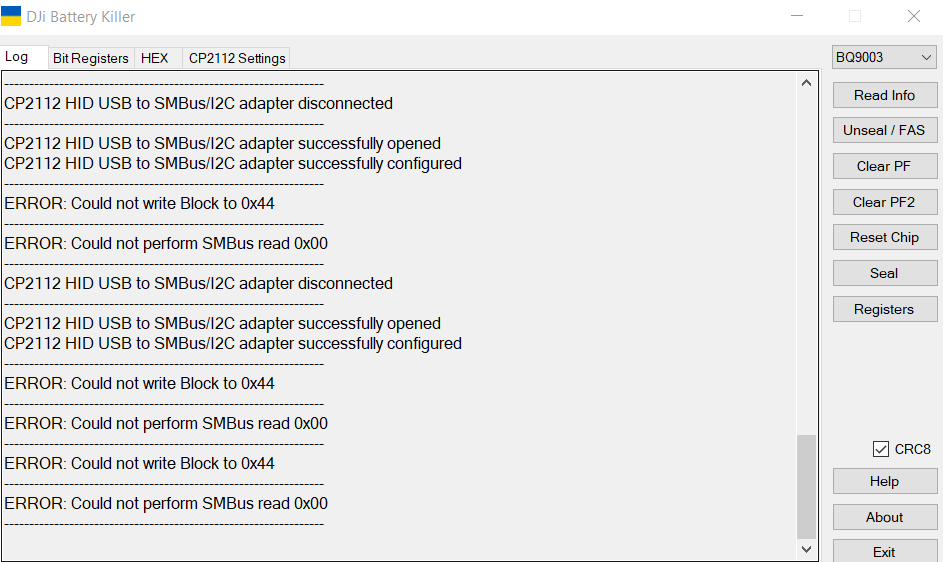
Any assistance would be greatly appreciated.
Best regards, Dave
Hello Dave,
You will have to inject 12v to the battery. I used a 12V adapter of my set top box and inserted the + in the 1st pin and the - to the last pin of the battery and it worked perfectly. You can try that
I am new to this forum. I have a Mavic Air which was lying since last 5 years as the 3 batteries were not working and my nephew just bought a DJI Neo drone and asked about my drone and then he told me that the Air batteries can be revived. So i began searching the web and then stumbled upon this forum. Went thorugh it thoroughly (almost) and was able to revive the batteries but the cells very not working properly anymore and then i bought Liion 18560 cells and made a battery pack. Now the issue that i am facing using DJI battery Killer is that i am getting the following error:
Write Block 0x44 <= 5400
Read Block 0x44 => 540000610000
Chip is Unsealed = SEC1 = xxxxxx01
Write Block 0x44 <= 5400
Read Block 0x44 => 540000610000
Clear PF successfuly
Write Block 0x44 <= 5400
Read Block 0x44 => 540000610000
Chip in FAS = SEC1 = xxxxxx01
Read Block 0x44 => 02040123456700007E650000CC4CCA270753554E574F44410000000000000000
ERROR: PF2 is not active.
Any help or suggestion for this.
And as for the Lion cells they are 3000 mAh. And how to load this info on the BMS through DJI battery Killer.
Thanks in advance…