“Crashy” our DJI Platinum is not compatible with the fly software. Go 4 which i have been using is now not supported on new devices. Some of my old devices are running really slow and was wondering if there was any get around to install it. Or is it compatible with the other drone software out there. This device is not compatible with a screen controller.
Whilst it can fly without a phone attached its performance is limited including speed.
DJI has GO, GO4, Pilot and Fly. Plus other software for more specialised aircraft.
What problems are you having installiong GO4? I run it on various Android devices of varying power and ages with no noticeable problems.
If you are looking for an alternative I would recommend Litchi - which, as well as doing the same as GO4 is ideal for pre-planning and on-the-fly (sorry!) waypoint missions.
This is the list of aircraft supported:
Mini 2, Mini SE (version 1 only), Air 2S, Mavic Mini 1, Mavic Air 2, Mavic 2 (Zoom/Pro), Mavic (Air/Pro), Phantom 4 (Standard/Advanced/Pro/ProV2), Phantom 3 (Standard/4K/Advanced/Professional), Inspire 1 (X3/Z3/Pro/RAW), Inspire 2 and Spark.
For newer devices there is Litchi Pilot, supporting these:
Mini 4 Pro
Mini 3 & Mini 3 Pro
Matrice 4 (4E, 4T, 4D, 4TD)
Mavic 3 Enterprise (3E, 3T, 3M)
Matrice 30
Matrice 300 & 350 RTK
Matrice 400
Unsupported hardware in Litchi Pilot:
Lito X1 / Mini 5 / Air 3 / Mavic 3 / Mavic 4: there is no SDK for these yet however you can use Litchi Hub to plan flights
DJI RC1 & RC2 (with built-in screen): it is not possible to install apps on it
iPhones and iPads: DJI no longer supports the iOS platform with their latest SDK
32 bits devices (such as Samsung A13, etc): DJI no longer provides 32 bit libraries
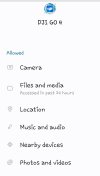
Installing is ok but it says it wants me to allow access to external storage. However, it is already allowed so each time I try to run the software it tells me again that it is not allowed. I have allowed EVERYTHING even if not required.
Did anybody find a way to resolve this issue. I’m having the same issue and can’t figure out how to resolve it so I can’t fly the Spark drone. PLEASE HELP
Galaxy A34 5G
Android version 14
DJI Go 4 version 4.3.62
I just had the same problem. I turned out that while the app was given location permission, location services were disabled on the system level: Settings > Apps > (three dots) > Permission manager > Location