Hi all
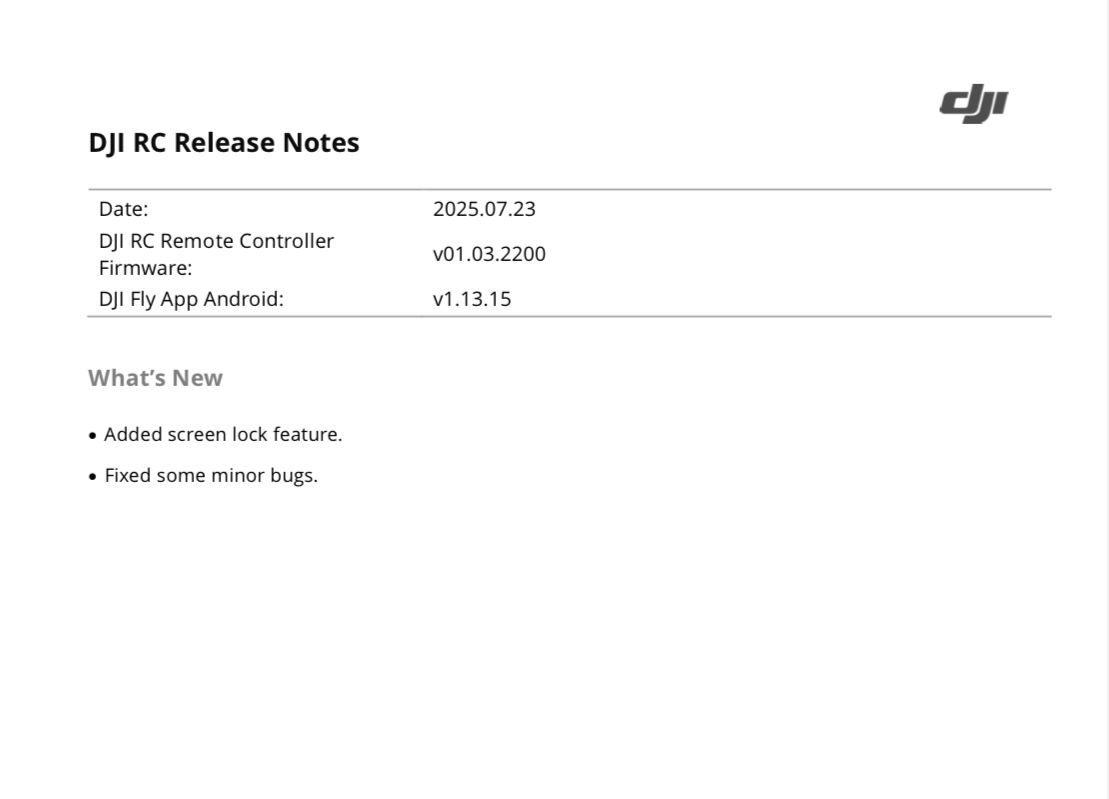
My DJI RC is showing firmware as up to date…but the fly app installed is 1.13.15
How can I force it to upload the latest version of the fly app ?
Thanks,
Mick
Hi all
My DJI RC is showing firmware as up to date…but the fly app installed is 1.13.15
How can I force it to upload the latest version of the fly app ?
Thanks,
Mick
In the fly app try
Profile - Settings - About - check for update
I’ve done that but no joy. I thought I would ask here if anyone else has had the same issue?
Silly question perhaps, but is it connected to WiFi?

yes
What is the current Fly app version for the original DJI RC? 
What happened? Did it throw an error? Or is no update available?
Have a look at this,…if you haven’t already
current version shows 1.13.15 with no update available !
And this?
That was kinda my point, you might already be running the highest / latest version for that controller 
ah, ok thanks.
Don’t quote me on that, but it might be the reason no updates or higher versions are available.
I’m sure someone with the DJI RC will be along soon to confirm which version they’re running 
let’s hope so. I asked because when I was away in Scotland last week the controller wasn’t showing the home point on the screen even though the app had told me homepoint updated.
weird.
That’s what I have, thanks.
You could always force update ( at your own risk ) of course - if it doesn’t play ball just reset the controller maybe ?
Put it on an sd card & do it that way here’s the latest fly app below if you wanted to try it just a thought -
Thanks @PitchFader
If it’s at the correct app version now that’s fine.
I did factory reset the controller then signed in again but it still stays at the same version number so I’m guessing it’s right.
I wouldn’t know how to load the app from an sd card with the RC controller. I wouldn’t mind trying that!
Is it an easy thing to do?
Well
Speaking from experience but with the RC Pro mind ‘ yes ‘ it’s easy, you just download that link ( which I checked yesterday ) then copy app file to an sd card put it in the RC & it should give you the option to instal, just follow the on screen it’s very straight forward easy to do ( however ) I did hunt high & low last night regarding your controller but couldn’t find anything relating to any later app that anyone has installed or tried, also only going from experience with the RC Pro which is also android as you know is, regardless to it not supporting the later drones that have been released over the many months is, every time a new fly app is released it’s always there to instal if you wish & the RC is also running an old firmware which works fine & the fly app an older version which works fine as well hence the reason I’ve never updated it as it has always functioned well & on the later app versions there’s never been anything there of interest in regards to the update if that makes sense,
So I just found it odd that DJI still pushes the option there for fly apps for the pro but not your RC RM330 id say it’s worth a try others may disagree but that’s just me 
Edit : here’s the steps from Google
You can install the DJI Fly app on the DJI RC RM330 by
“Install from Unknown Sources” in the security settings and then transferring the [APK file] You will need to download the app’s APK file to the card on a computer first, then insert the card into the controller and use the controller’s file manager to install the app.
Thanks for the info, very interesting.
I will keep it “as is” for now.
Thanks all for your postings.