I have just plugged in my RC2 to my desktop to download all my holiday media and none of it is visible to download. How do I get the files off the controller?
Have you downloaded it from the drone to the RC2
If you are using an SD Card you can just put the SD Card in the computer or card reader, other wise you need to copy to the RC2 from the drone
Actual flight footage is stored on the drone itself, while the controller only holds cached files or screen recordings/screenshots 
To connect your DJI RC 2 to a computer, plug a data-capable USB-C cable into the USB-C port at the bottom of the powered-on remote controller and into your computer’s USB port
Steps to Connect and Access Files
- Power on the DJI RC 2 controller
- Connect a USB-A to USB-C or USB-C to USB-C data cable (ensure it is not a charge-only cable) from the controller’s port to your PC or Mac.
- For Windows: Open File Explorer, look for the controller under “This PC”, and browse the internal storage or inserted microSD card to access folders like
DCIMormoviesfor screen recordings. - For macOS: Mac computers require an Android-compatible file transfer utility (such as OpenMTP) to recognize and browse the DJI RC 2’s Android file system.
- Locate Logs or Footage: Navigate to internal storage or the SD card to copy flight logs (
FlightRecord), media, or screen recordings directly to your computer desktop.
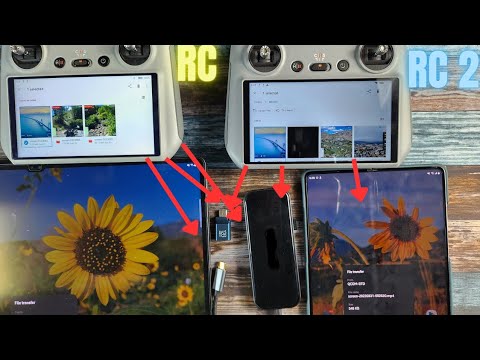
Right. So, how do I do that?
I have recorded half on the SD card in the drone (all footage downloaded) and the other half I recorded when I took the SD card out. All this footage is playable back on the RC2 with no issue, but it is nowhere when plugged in.
I did download 1 file from by pressing on the download button on the controller, and it has downloaded a 0 byte file which is called “pending dji fly” and a load of numbers. I have called both DJI and a local drone shop, both say the files should be visible and downloadable. It makes no sense. I have loads of footage I can’t access.
Thanks but done all this - controller has absolutely nothing on it when plugged in, every folder is empty.
Actual high-resolution drone footage is stored on the microSD card or internal storage inside the drone itself, while the DJI RC 2 controller only saves low-resolution cached video or manual screen recordings.
Cached Flight Videos and Screen Recordings
- Location: Internal storage of the RC 2 controller]
- File Path (Internal Storage):
Internal Storage/Moviesor via the Android file structure underAndroid/data/dji.go.v5/files/media cache. - How to access: Connect the RC 2 to a computer with a USB-C cable (Mac users may need the Android File Transfer app) or navigate through the controller’s internal storage settings under Storage > Audio/Music > Movies. Most users on Reddit note that screen recordings default to internal memory rather than an inserted controller SD card
If your talking about the mini 3 in your profile it has no internal storage on the drone, the footage on the controller is low res cached video. Even if you recover it it will be very low resolution.
Files should have saved to Android/data/dji.go.v5/files/media cache they don’t have a time limit before being cleared.
Depending on the space available on your controller older files may get overwritten . Clearing cache files is down to the user
Ok, this might be me being a buffoon, I think I have mixed up the media on the card and controller. I think I have actually downloaded whats on the controller already and forgotten to download whats ion the card.
Ok, yes looks like it was me. I have downloaded the controller files already (only 40 of videos) and it was actually the other 84 videos on the SD card that were pending. I am drowning in footage and images so got confused. Cheers
Did you by any chance take the microSD card out of the drone and place it into the RC 2 controller?
No I took it out completely. Basically, we just had the holiday of a lifetime and half way through I decided that I would record media on the controller so that I didn’t lose media if I lost the drone. I ended up taking some pretty risky shots and I knew that if I left the card in, a lot would be lost if the drone disappeared.
When I got back (long journey and brain not working) I mixed up what was on the card and what wasn’t. Going to post a mini reel later, got months of footage to make videos from.
This 
Its perfect 4K this end! About to post a reel in videos.
Then they were downloaded from the drone to the RC after the flight as the VTX doesn’t have that high level of a data rate
Yes I guess the footage was recorded on the drone itself - I am amazed at how much it took.