Free Drone Flight Management Software - Looking for Beta Testers!

Hey everyone,

I’m a Computer Science student (gotta fund the next drone somehow!) and I’ve been building a web-based flight management system called FlyingPlan, designed specifically for drone photography and inspection businesses. It’s completely free, open source, and I’m looking for people to test it and give feedback.

It handles the entire job workflow from customer request through to mission delivery. Here’s what it can do:

Your clients fill out a 5-step request form with their details, job brief, location on an interactive map where they can draw flight areas and drop points of interest, flight preferences like altitude, camera angle and resolution, and file attachments. They get a unique reference number when they submit.

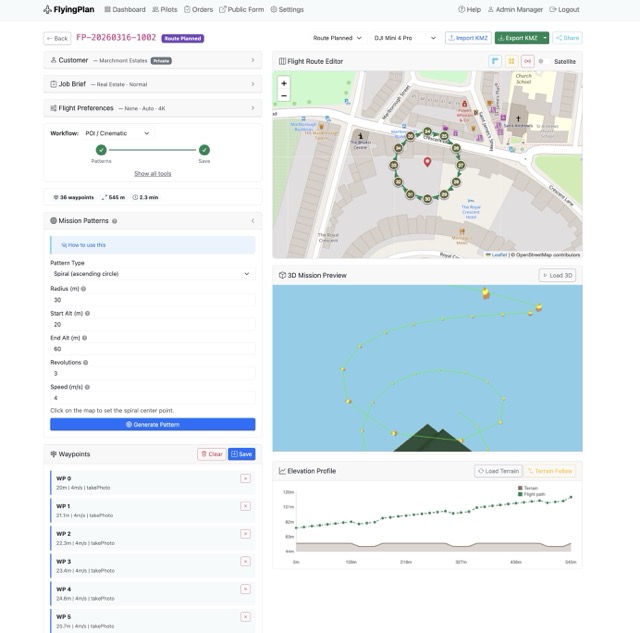
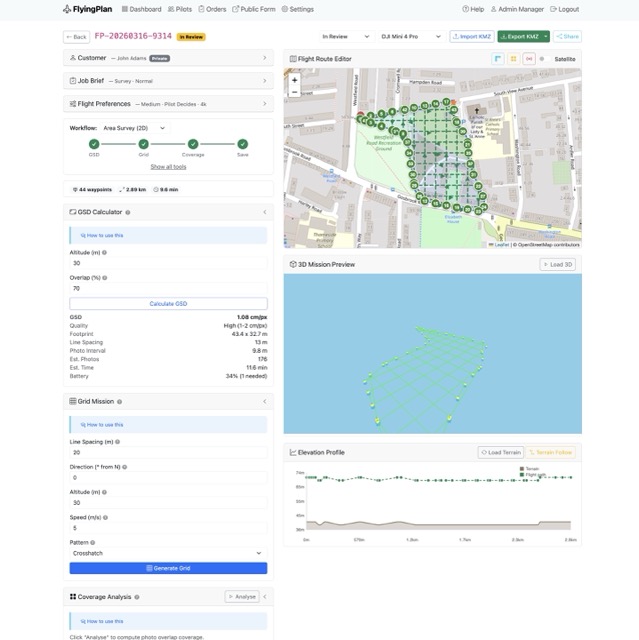
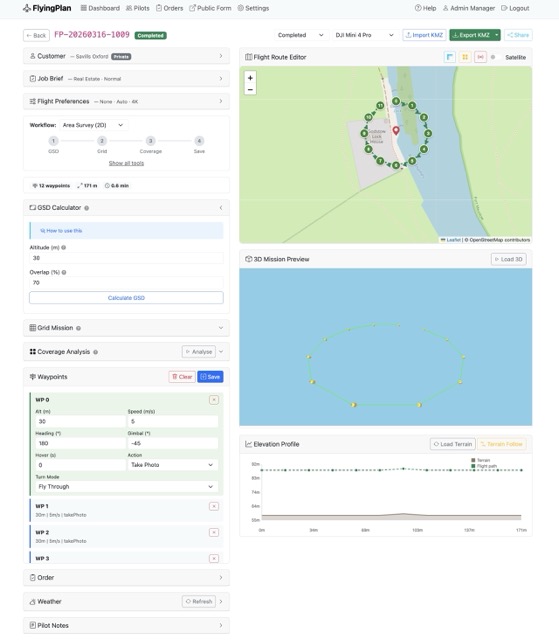
You then plan the mission on a map by placing waypoints with individual settings for altitude, speed, heading and gimbal pitch. You can add points of interest for the drone to face during flight. Once the route is planned you can export it as a KMZ mission file that loads straight into the DJI Fly app on a DJI Mini 4 Pro, or preview it in Google Earth Pro.

You can register your pilots with their certifications, Flyer and Operator IDs, insurance documents and equipment details. Assign jobs to them, track their availability, and they can accept or decline orders from their own dashboard.

Before any flight the pilot has to complete a 28-point pre-flight risk assessment that covers site assessment, airspace, weather, equipment checks, pilot fitness using the IMSAFE checklist, permissions and emergency procedures. This is CAA compliant and the system actually blocks the flight from starting until it’s done. It also captures the pilot’s GPS location as proof the assessment was completed on site.

Every job moves through enforced statuses from pending through to closed, with a full activity log creating an audit trail of who did what and when. The system generates professional PDF flight reports with customer details, route maps, risk assessment results and the activity log. Pilots upload their deliverables like photos, videos and documents directly through the platform.

You can also customise it with your own business logo, colours and tagline, configure which job types you offer, and control what appears on the customer form. There are three user roles with proper permissions so pilots only see their own jobs while admins and managers have full access.

It runs on Python and Flask with SQLite so it’s lightweight and easy to set up locally. There’s a demo command that fills the system with realistic sample data so you can explore everything straight away.

You can find it here: https://github.com/AmigoUK/FlyingPlan

Would love to hear from anyone willing to give it a go, especially if you’re running a drone business and can tell me what’s missing or what could work better. All feedback welcome!

Cheers
Tom
8 Likes

Funny how one feature leads to another — once I implemented KMZ export for autonomous flights and photo capture, I started thinking: why not add KMZ import as well, so people can reuse existing mission files?

And if I’m already going down that road, maybe it makes sense to build out some proper mission planning tools too — coverage calculators, overlap estimates, flight time, battery planning, that kind of thing.

It’s basically just maths and logic underneath, so I think I can do it. Curious what else drone operators would actually want from something like this.


1 Like

FlyingPlan — Tomasz Lewandowski link to demo. Still working after rewrite most of part from Python to PHP (allow to install on most thypical hostings…

Afternoon, I could very well be your target audience for something like this.

First things I noticed whilst having a play. Most of my requests come in through email, I’m not always going to ask a customer to complete a form like this. There is no way for an Admin to create a brief.

If the customer is completing the brief, some areas should be hidden by default - like the flight preferences. Most folks don’t know the altitude they want, nor the angle, resolution, etc. They’re nice-to-haves but make the process long-winded. I appreciate they’re not “required” fields, though it is intimidating. This is especially important for new customers, I want their details first… saved - even if they never enter any details about the flight afterwards. This may be a future lead I can follow up, at least finding out why the bailed on the form.

It’s a really clean design style and Dark Mode is a fantastic. Though I struggle with the Actions column, over something like row click to drill down. Is there a reason for this choice? Were you planning to have more actions in future other than view?

Edit 1: In the Flight Route Editor, an undo button would be great! I’ve already fat-fingered a bunch of waypoints that needed removing.

It’s some great work! I’ll keep digging and see what else I find.

1 Like

Like @Talldrone I have had a quick play.

I pretended to be a customer, nice to find that I could bring up the map using a postcode. It adds to the clutter but it might be nicet o show that you can enter address, postcode, what3words etc to add location.

Like @Talldrone there is stuff there that I wouldn’t expect a customer to fill out or be botherewd with. I went in as a farmer wanting a survey to find weeds and diseases in a crop. All I know is that you fly around a bit and produce pretty little coloured maps showing the problem areas. I’ve no idea what height you need to fly at (hint - it depends on both the camera and the aircraft as well as the resolution required.

As a customer I don’t know - or need to know - about FRZs, other restrictions or sensitive areas - surely that’s down to the operator.

Maybe the contact form need to be name, address location, type of job and proposed date. Contact details a must so that the operator can get back to the customer to discuss.

Nice design.

1 Like

Thanks a lot, really appreciate you taking the time to test it properly.

This is exactly the kind of feedback I was hoping for. A few of the points you raised definitely show I need to rethink how much gets shown to the customer at the start, and I agree the admin side needs more flexibility too.

I’m also wondering whether it would make sense to split things more into an admin view and a pilot view. From your side, do you think that makes sense in real use, especially for a one-person operation where the same person is doing both jobs anyway?

Also, if you spot anything else, screenshots would be really useful as they often explain the problem better than text. Feel free to send them over to hello@attv.uk
.

Online demo:

Thanks a lot for trying it out and for the honest feedback.

It’s really useful hearing this from the customer side, because it confirms I probably need to make the first step much simpler and keep more of the technical stuff on the operator side.

One thing I’m thinking about now is whether the system should be split more clearly into an admin view and a pilot view. From your point of view, would that be useful, or for a smaller one-person business would it just make things more complicated than they need to be?

And if you notice any other rough edges, screenshots would be a big help as they make things much easier to understand. You can send them to hello@attv.uk

I see the customer side as providing a menu of services means of contact so that customer and operator can then discuss the job in detail.

How customisable is it for the operator? I’m thinking that someone solely doing roof surveys doesn’t need a full drop down of services and possible not drawing tools on the map whereas an agricultural operator would benefit from drawing tools and a drop down for the various types of crop and crop health surveys.

The requirements of a one man band are different to those of a business with several pilots, maybe to the point of having a “Lite” version and an Enterprise version - or modules allowing the first to be built into the more complex setup as the business expands.

1 Like

Thanks, that’s really helpful feedback.

You’ve picked up on something important there — the needs of a one-man band and a larger multi-pilot business can be very different, and I think the product probably needs to reflect that more clearly.

At the moment there is some operator-side customisation, but not yet to the level you’re describing. I really like the idea of making it more modular, so a simpler Lite setup could work for smaller operators, while more advanced workflow and team features could be added as a business grows.

Your point about service-specific setup is a very good one too. A roof survey operator and an agricultural operator shouldn’t necessarily see the same form structure, map tools or service options.

Really appreciate this

Tom

Hi @macspite @TallDrone ,

A quick FlyingPlan update — I’ve pushed a batch of fixes and improvements based on recent testing.

That includes updates to mission planning, 3D preview, terrain safety, map usability, dark mode, demo access, settings, and fresh install/demo data handling.

I’ve also been building the bigger workflow changes in the background, including:

  • solo operator mode
  • quick-create from phone/email
  • cleaner feature visibility
  • more configurable modules and form options
  • profile-based setup templates

Big thanks to everyone who’s tested it so far — your feedback has been genuinely useful.

If you’ve got a few minutes, I’d love more testing and honest feedback:

If anything feels confusing, clunky, or broken, send me a message or email screenshots to hello@attv.uk.

Have a Great Easter!

I’m just of out to the meeting at Portchester Castle - weather looks marginaal but, if nothing else it will be good to see people in the flesh again after a lean winter for flying. I’ll mention this thread and see can i get more testers.

I’ll give this a proper look over the weekend

1 Like

jelous :grinning_face_with_smiling_eyes: