Question 1…when i open up a new waypoint mission…i create a new project and when i touch the screen the explorer app show that i have created a new waypoint 1 but there is no symbol showing on the map…i then touch the screen for the second waypoint and it shows i have created a second waypoint but again without the symbol saying number 2…when ive vreated my mission all i can see on the screen is my route showing as blue lines…if i click on the lines it show the waypoint number and i can edit it but still there is no Symbols telling me on the map which waypoint is which…any help please.
Question 2…when i am editing the actions for each waypoint it gives me upto 60 seconds of recording video…is there anyway i can increase this time or is there anyway of just videoing the whole mission…
Thanks in advance guys
Terry
Not sure id this is any help …
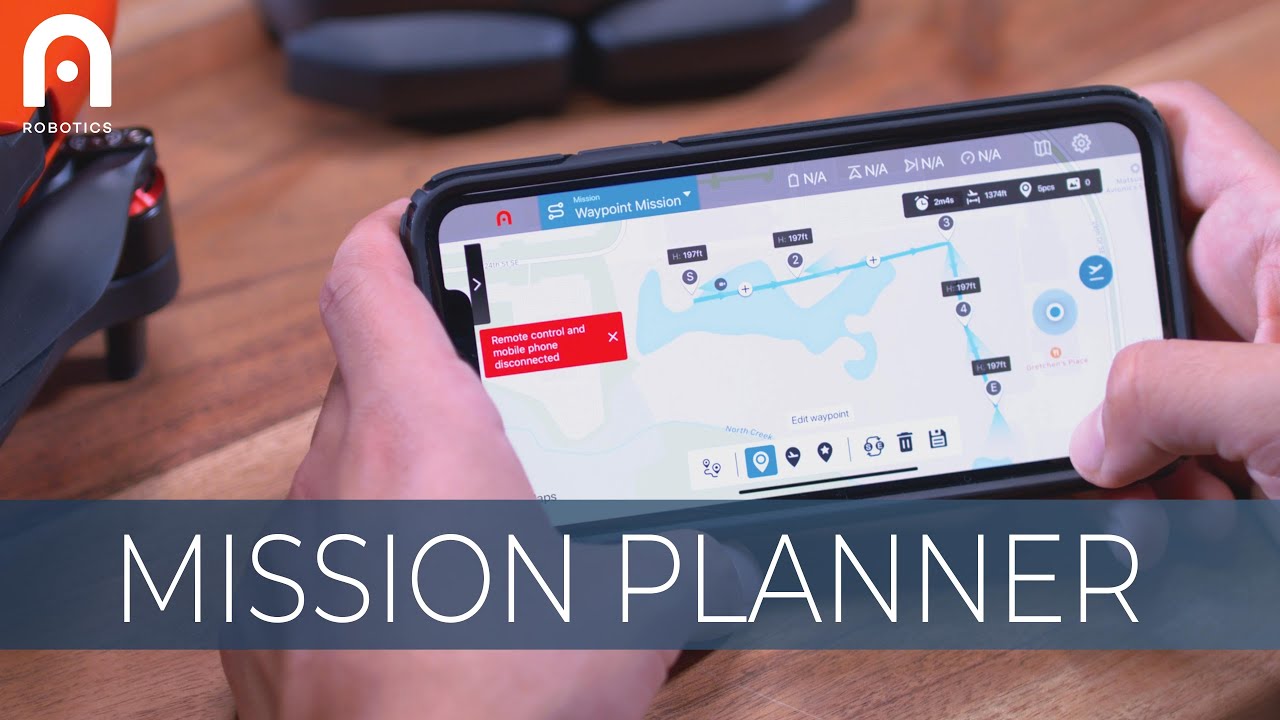
seen it thanks…no good…
Are you using an Android or iOS device ?? - if its Android - is it on an approved device ?? Android has so many variations 
Its on the new autel smart controller with the big screen…its android run i think…i figured out the waypoint symbols…now only got to sort out increasing the 60 seconds of video between each waypoint…Thanks
Strange its giving you problems when using the Autel controller.
Care to share how you fixed the Waypoint symbol issue - just for the benefit of others that may suffer the same problem 
Hi…the waypoint markers on the Autel Explorer arent available when you tap on the screen when you first start the Waypoint app…you have to g
look at the bottom menu where you will find one of the options has a squiggly line with a S at one end and an E at the other…you have to press this first so the explorer knows you want to plot a route…thanks