Thought of that option col 

1 Like

2 Likes
I use an Apple Mac Mini M1 with a 27 inch monitor and Da Vinci Resolve. It’s fine but a 4k monitor would be better.
1 Like
Thank you @Crusader for your input,
Just off to the store( stores) now to see what’s what 
Many thanks
Right so I have been out to take a look & have a play with the Mac monitor,
I didn’t go to Apple as I remembered I had a mate who works at curry’s ( nope wouldn’t buy from them again ) another story, but thought better where I’ve got a bit more time less people around coughing & sneezing all over me etc etc,
So waited for my mate to introduce me to Abdul in the computer section, plugged my laptop into the Mac monitor to compare screens first ( brightness detail & all that malarkey ) so after getting everything rigged up ( trying to use their Magic Keyboard & Mouse I wanted to throw it across the shop ( Mouse & Keyboard that is  ) user error !
Anyway once paired I found it easier using my hand on my Mac to operate the Mac monitor it was a breeze to use & the bigger screen made me feel more sat back rather than hunched over my smaller screen ( I really enjoyed what I was seeing & was so comfy ) so thought I’ll open up a few pictures I’ve already edited & compare those on either screen / side by side & asked Abdul to be a second set of ( honest eyes & no bull crap ) so we was both comparing notes & I asked what he thought already knowing in my own head “ what I thought “ to which he said the smaller screen looks a bit sharper which I agreed but the colours were pretty much bang on the same, so flicked through a few more edits including one that has solid black in it & again little to no difference, yes ok I’ve accounted that I’m in a store that is very well lit with lots a glare so may tell a different story in a darker room ( especially when it comes to the blacks / shadows darkest parts )
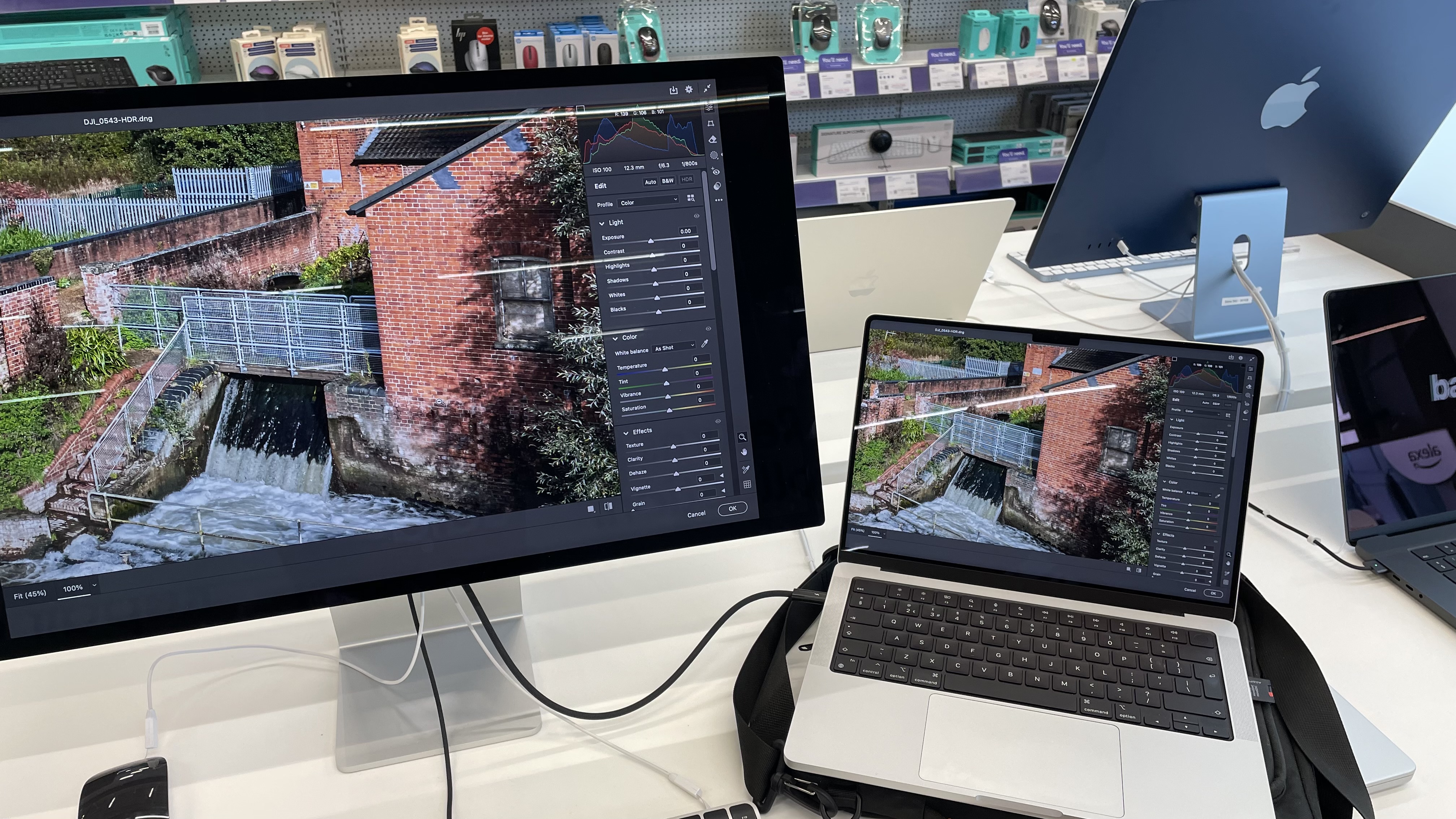
So based on that I said to myself & Abdul I love the colours comparison etc but maybe as that particular picture was edited on the smaller screen is maybe why it has that sharpness compared to on the bigger screen ( you had to really pixel peep to notice btw ) So I said as we all view pictures on different screens, ie phones tablets this size that size etc I’m sure what one screen says the other might tell different so what I’ll do is open up a raw file & give it a blast on the bigger screen, so I dragged a set of brackets same place same day but a different shot & just had a play in camera raw / photoshop wasn’t trying to do anything in particular just messing around with the sliders, anyhow putting the colours to the side as I wanted to see if I could get the picture to look sharper on the bigger screen, so what I noticed I could do was, was push a bit harder with more clarity & or texture as well as sharpening until it was a happy medium on the bigger screen then look at the smaller screen to compare again ( as usually on my smaller Mac I’ve never been able to push what I mentioned above that far ) if that makes sense I then did notice on the smaller it looked over sharp, I’m no expert but my thinking was smaller screen you push this much in & then it can look over cooked, bigger screen covering a bigger area can take more of a bashing “ just a guess “ ?,
So final thoughts I really like it & I was expecting it to be horrendous with some of the reviews floating around on YouTube, to work with it was just “ there “ no using a magnifying glass for this & that ( figure of speech ) it so far ticks more boxes than not & I really like it, I think the display is fantastic & again I see no real difference as stated above but maybe someone else would spot some downsides more than myself maybe,
So now on to the downsides that I found out for myself, firstly unless user error ( even Abdul wasn’t sure ) was when the screen is powered on it did not light up until I paired it with a thunderbolt to my MacBook ? I can could live with that or maybe a setting ? I know very little about this set up, downside number two was when in screen mirroring mode the bigger screen had a very tiny tiny lag compared to my M2 it didn’t do it always but was only just noticeable as I was viewing the two screens at the same time of doing tasks ( for this test ) is it a major ? could I live with it ? probably as it’s no biggy tbh ( maybe as it’s a lower refresh rate ? Oh also when screen mirroring it chopped a bit of the screen size on the bigger screen at the sides it does not do it in clamshell setting maybe ?, on the upside when your working in clamshell ( just the big screen ) I did not notice this lag, the mouse & keyboard ( I would want a track pad at some point to ) but i think it’ll be a case of getting used to the separate 3 components but as said was a breeze using my Mac as the controls call it if you will was really ease of use,
Now the gamble ( rumours ) is that next year at some point Apple is suppose to be refreshing this model with led or something which I would guess be much better but nothings guaranteed but it’ll be just my luck  it is what it is I guess & tech changes, that said if it was complete & utter shitte why have apple been usuing this tech on their monitors for the last 7 years I think I read somewhere ( am not comparing to the XDR Display tho as that’s another level ! ), can’t be that bad just a bit over priced ?
With all that said what I think would be a fantastic alternative ( which wasn’t on the agenda & I don’t really want to I just don’t ) is a 16.5 XDR MacBook Pro - yes it’s only a couple of inches bigger but it’s a huge difference when your eyes are squinting / hurting & I’m guessing a very popular size used by many these days, then if a better monitor comes out add the monitor to that at a later date ? Just a thought but a thought that I don’t want to be thinking about I really don’t !
Anyhow’s I’ve come home to have a think on it & I’m pretty much sold on it so far & has exceeded to what I was expecting & in all honesty I absolutely love it & that’s for what I saw today picture wise( quality ) let alone the aesthetics as I love Apple products so this is was all based on the job it’s supposed to do, I grabbed a couple of side by side pictures whilst I was there the pictures don’t do it justice for the details as mentioned above but also wanted to compare the colours, first picture is one that was already edited & the second picture was the raw I mentioned above seeing how far I could push it which was further than the M2 but the pictures don’t do justice & was really only for my own personal but thought id post them here anyway, if you’ve made it this far thank you for reading I really appreciate any further input also,
Comparing below

Having a play in photoshop below,
Oh the sliders are all set to zero as I opened it in ps by accident then opened it back up in raw useless info but thought id mention,
1 Like
Hi, for what it’s worth I have a 2019 iMac 27" with a Retina display. I used to do a lot of high end DSLR image editing. Now I use 4k drones and the 5k screen quality is good. Screen quality should exceed the drone output. Display should be widescreen.
Below are all the specs for this model. If you wanted there are a lot of other models to choose from.
2 Likes
Thank you @Nikonitis I’ll have a browse once I’ve made a brew,
Many thanks …
1 Like
If you’re not looking for the latest cutting edge technology in an Apple monitor, there’s always the option either Apple approved refurbished or the 2nd market.
Amazon has the 27” Thunderbolt 5k monitor for £350
2 Likes
Yes I thought about Apple refurbished & did take a little browse ( couldn’t find monitor ) but what they do have doesn’t seem like much of a bargain tbh,
I did try Amazon refurbished once for a windows laptop & it was not as described it was beat to death then kicked around the warehouse then stamped on I think ….
3 Likes
The i5 isn’t a patch on the M2 in @PitchFader MBP
1 Like
If you’ve got money to burn, I recommend getting an Apple Vision Pro. I use Mac Virtual Display with my 14” M3 Max for a huge 4k screen for Lightroom and DaVinci. Means my small laptop can be used anywhere with a massive (virtual) display.
There’s an update coming soon that’ll enable a 2x 4k display in the Vision Pro. Image quality is incredible. But… yeah. It’s not cheap.

1 Like
Call me old skool but id rather have a screen in front of me but can’t say I’ve properly tried any kind of virtual reality - the closest I’ve got to wearing those kinda goggles was trying Fpv which I felt a bit claustrophobic …
Thanks for your input
Vibrant 
3 Likes
I knew it
3 Likes
Tingling hands
2 Likes

I’ve just done an HAVS (Hand Arm Vibration Syndrome) training course, so I can do the risk assessment, the next time @PitchFader flys an Avata. 
2 Likes
I have carpal tunnel syndrome in my right hand also my left hand but worse in the right than left, I had to go to the hospital a while back & they wired my hand( hands ) up to some sort of electric gizmo - the doctor was surprised the amount he cranked up into my right hand, I walked away from the operation when he said they go through your wrist ( whilst awake ) don’t fancy it tbh 

Some days worse than others I think it was at its worse the day of the big meet to not realise I was using the wrong controller
It might be worth heading over to the AV forum. They have a section on computers and digital media. Could give you a different take, posing the same question to a different audience. There is also a section on drones and photography, albeit much smaller than here.
Please share a link to the AV forum